Spring Wildflower Digital Paper: A Guide to Choosing and Using High-Quality Floral Patterns
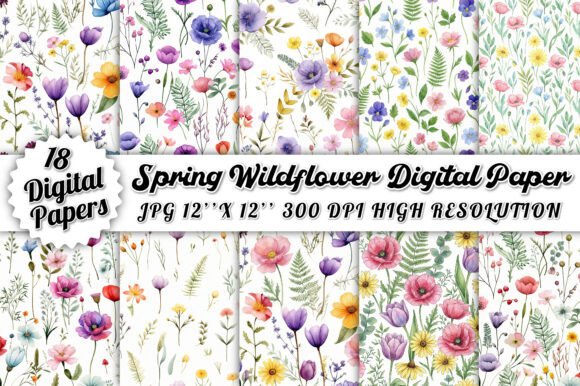
Integrating the fresh beauty of nature into your creative projects can transform a simple design into something truly captivating. The Spring Wildflower Digital Paper Pack offers a stunning collection of 18 high-quality floral patterns inspired by blooming spring meadows. These designs feature delicate wildflowers, soft pastel tones, and elegant botanical elements that bring a natural, refreshing touch to your work. However, many creators rush into downloading and using digital assets without fully understanding how to maximize their potential or avoid common pitfalls. Whether you are designing invitations, scrapbooking, creating planner pages, or developing branding materials, understanding the nuances of digital paper usage is essential for professional results.
Understanding Resolution and Print Quality
One of the most frequent mistakes beginners make is overlooking technical specifications, particularly resolution. When you purchase a set like the Spring Wildflower Digital Paper Pack, you are provided with files at 300 DPI (dots per inch) and a size of 4500 x 4500 pixels. This high resolution is critical for print products. If you attempt to stretch these images beyond their intended dimensions or use low-resolution previews for final prints, the result will be pixelated and unprofessional.
For example, if you are creating large-format posters, a 15 x 15 inch file at 300 DPI is perfect. However, if you try to enlarge it to 30 x 30 inches without proper software handling, the quality will degrade. Always check the dimensions before starting your project. For digital-only uses, such as social media backgrounds or website headers, you may need to resize the files to optimize load times, but always keep the original high-quality master files safe in your archive.
The Importance of Seamless Patterns in Design
A common misunderstanding among new designers is the difference between standalone illustrations and seamless patterns. The Spring Wildflower Digital Paper Pack features seamless patterns, meaning the design repeats perfectly without visible edges or breaks. This is invaluable for creating backgrounds, wrapping paper, or fabric prints. A frequent error is treating these patterns as single-center images, which limits their utility.
To avoid this, utilize the seamless nature of the files by tiling them across larger canvases. In software like Photoshop or Canva, ensure that the "tile" option is enabled when applying these textures. This approach creates a cohesive, endless field of wildflowers that enhances the visual appeal of invitations and journal covers. Ignoring this feature means missing out on the versatility that makes digital papers so cost-effective compared to custom illustrations.
Color Accuracy and Screen Calibration
Another overlooked detail is color consistency between screen and print. The soft pastel tones and vibrant wildflower hues look beautiful on a calibrated monitor, but they may appear differently when printed. Many crafters complain that their prints look dull or shifted in color, not realizing that their printer settings or paper type are the culprits.
To mitigate this, always perform a test print on the same paper stock you intend to use for the final product. Adjust your printer’s color profile if necessary. Additionally, remember that digital screens emit light, while printed paper reflects it. Designs that look bright and airy on screen may require slight saturation boosts for print to maintain their vibrancy. Being proactive about color management ensures that the delicate botanical designs retain their charm in physical form.
Licensing and Commercial Use Considerations
For small business owners and freelancers, understanding licensing terms is crucial. While many digital paper packs allow for commercial use in end products like invitations or printed planners, they often restrict the resale of the digital files themselves. A serious mistake is uploading the raw JPEG or PNG files to a marketplace for others to download. This violates intellectual property rights and can lead to account suspensions or legal issues.
Instead, use the Spring Wildflower Digital Paper Pack to create value-added products. Incorporate the patterns into layered designs for greeting cards, branding kits, or digital planner stickers. By transforming the raw assets into unique creations, you respect the creator’s rights while building your own brand identity. Always read the specific license agreement included in the ZIP file to ensure compliance.
Organizing Your Digital Assets
Efficiency in creative workflows often comes down to organization. Downloading the ZIP file containing all 18 unique papers is just the first step. Many users leave these files scattered in their downloads folder, leading to wasted time searching for specific patterns during tight deadlines. A better approach is to create a dedicated library for your digital resources.
- Categorize by Theme: Group floral papers separately from geometric or abstract patterns.
- Use Preview Thumbnails: Generate small preview images if your operating system does not display them clearly, making visual selection faster.
- Backup Regularly: Store copies on cloud storage or external drives to prevent data loss.
This systematic approach saves hours over time and allows you to focus on creativity rather than file management.
Maximizing Versatility Across Projects
It is easy to pigeonhole digital papers into traditional crafts like scrapbooking. However, the Spring Wildflower Digital Paper Pack is versatile enough for modern digital marketing and branding. Bloggers can use these patterns as subtle background textures for quote graphics, enhancing readability while adding aesthetic appeal. Educators might incorporate them into worksheet borders to make learning materials more engaging for students.
When using these patterns for branding, consider opacity adjustments. Lowering the opacity of a busy floral pattern can create a sophisticated watermark effect for business cards or letterheads. This technique adds depth without overwhelming the text. Experimenting with blending modes in design software can also yield unique textures that look custom-made rather than store-bought.
Final Thoughts on Selecting Digital Resources
Choosing the right digital assets involves more than just picking pretty images. It requires an understanding of technical requirements, licensing boundaries, and design principles. The Spring Wildflower Digital Paper Pack provides a solid foundation with its high-resolution, seamless, and aesthetically pleasing designs. By avoiding common mistakes related to resolution, color accuracy, and usage rights, you can elevate your creative projects significantly.
Remember that quality digital papers are tools to enhance your vision, not replace it. Use them thoughtfully, organize them efficiently, and apply them creatively. Whether you are a hobbyist crafting a family photo album or an entrepreneur designing product packaging, these botanical patterns offer a timeless elegance that resonates with audiences. Take the time to learn the capabilities of your tools, and your work will reflect the care and professionalism that sets successful creators apart.